⚔️ AuraSkills Configuration – Textured Skill Menus for AuraSkills ⚔️
Overview:
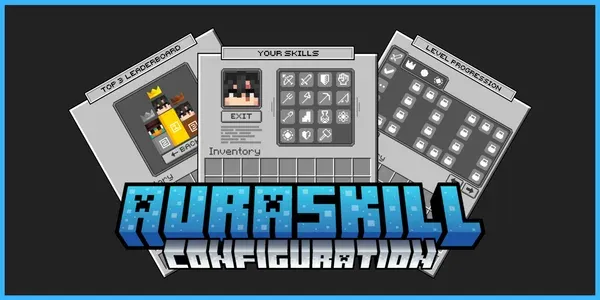
Replace the default AuraSkills menus with a fully textured interface. It includes custom backgrounds, unique icons for all 15 skills and stat icons that also show in chat. Drag it in, reload, and it’s ready.
Features:
- Textured menus – Skills, Level Progression, Stats, Sources, Abilities & Leaderboard
- Custom skill icons – all 15 skills, plus locked/unlocked/progress states
- Stat icons – STR, HP, DEF, Crit and more in lore and level-up messages
- Large player head – displayed in the Stats area
- Conflict-free – prefixed IDs and a separate model data range
- Plug & play – ready-to-use versions for ItemsAdder, Oraxen and Nexo
- Full guide – step-by-step installation guide included
In Game Preview:
Requirements:
- Paper 1.21.4+
- AuraSkills 2.x
- ONE of these: ItemsAdder 4.x, Oraxen or Nexo
Installation:
- Download: Purchase and download the AuraSkills Configuration files.
- Upload: Drag and drop the AuraSkills folder and your (ItemsAdder, Oraxen or Nexo) folder into your server’s “plugins” folder.
- Reload: Restart your server, or reload your pack plugin and run /skills reload.
- Note: A full step-by-step guide is included in the download.
Support:
Create a support ticket on our discord if you have any issues or questions about the configuration. We will assist you as soon as possible!
If you’re having problems, please reach out to us before leaving a review. Website • More Resources • Discord Server
Required: AuraSkills [FREE] : Download here PlaceholderAPI [FREE] : Download here
ONE of these: Oraxen [PREMIUM] : Download here ItemsAdder [PREMIUM] : Download here Nexo [PREMIUM] : Download here
AuraSkills Configuration
$7.00
- Textured menus for skills, stats & leaderboard
- Custom icons for all 15 skills
- Stat icons for STR, HP, DEF and more
Sign in with Discord at checkout. Takes 5 seconds.
- Works on 1.21.4
- Requires AuraSkills & PlaceholderAPI (free), plus Oraxen, ItemsAdder or Nexo
- Instant download after payment
- Free lifetime updates · updated 25 Oct 2026 (vFirst release)
- Help via Discord ticket
- Not working as described? We'll fix it or refund you.